


Racing fans can now tell Google which publishers they want to hear from, and adding GG to that list takes less than a minute. Once it’s done, our news, previews and tips are more likely to appear in Google’s Top Stories when you search for a race, a course or a horse.
The feature is called preferred sources. Google rolled it out to every country and language it operates in, and it applies to the Top Stories carousel that sits above the ordinary search results. Pick GG and Google gives our coverage more weight whenever we’ve written about what you’re looking for.
Why it matters on a racing morning
Racing news moves quickly between the first declarations and the off. Going changes, non-runners, jockey bookings and the day’s best bets all land in the space of a few hours, and a general news search won’t always put a racing specialist first. With GG set as a preferred source, our updates have a stronger chance of reaching the top of the page while they’re still useful to you.
Other publishers will still appear. Preferred sources do not filter anyone out; they simply tell Google whose reporting you’d like to see more often.
How to add GG through a Google search
The button above is the quickest route. If it doesn’t open properly on your device, the same setting can be reached from the search results page.
- Make sure you’re signed in to your Google account, as that’s where the preference is stored.
- Search for a racing topic, such as a meeting, a big race or a trainer in the headlines.
- Click Customise, which sits beside the Top stories heading.
- Type “GG” or “news.gg.co.uk” into the search box in the panel that opens.
- Tick GG, checking the web address underneath reads news.gg.co.uk.
- Select Reload results to refresh the page with your new setting.
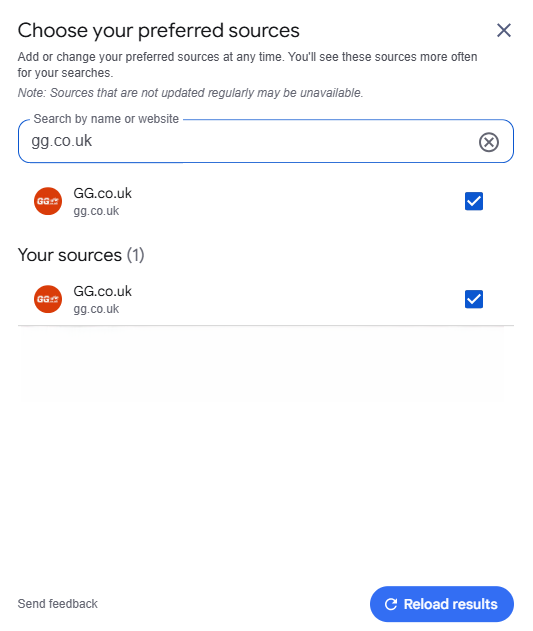
A two-letter search will bring up several unrelated sites, which is why the web address is the thing to check. Once GG is ticked, it is listed under Your sources at the foot of the panel. If Google lists more than one GG entry, choose the one showing news.gg.co.uk, as that is where our news, previews and tips are published.
After you’ve added GG
Nothing else needs doing. The next time you search for a meeting, our stories should feature more prominently, and you can head straight to today’s racecards from any of them.
Should you want to remove GG later, open Customise beside any Top stories heading and untick it. Google also notes that sources which aren’t updated regularly may disappear from the list. GG publishes racing news every day of the week, so that won’t apply here.